Much like a proxy, a Tunnel allows you to pass traffic from your filtered IP to another destination. This traffic is forwarded as packets at a kernel level as encapsulated traffic. A tunnel also forwards all packet details without the packet modifications required for techniques such as Reverse Proxying (RP), specifically this means clients connecting IP address is preserved.
Microsoft Windows does not support GRE or IPIP natively. GRE & IP-in-IP can be used on Microsoft Windows via a client developed for X4B customers. For more information on Windows Tunnel support click here.
Note: This method is more complex than the standard Reverse Proxy method. Unlike the former method this requires software/configuration on your backend server and should only be attempted by those with a reasonable level of Linux command line experience.
Using
Choose the appropriate process for your operating system.
On Linux & FreeBSD
This process has been tested on common versions of Debian, CentOS and a large number of Ubuntu server versions. FreeBSD is somewhat supported on a best effort basis.
Support
You will need to ensure that your backend has support for tunnels. A simple way to check this on Linux is to ensure that the ipip and/or ip_gre kernel modules are loaded. This can be done with the following commands.
lsmod | grep ipip
lsmod | grep ip_gre
In some custom kernels this feature may not be provided by modules, and may instead be compiled into the kernel. Additionally it may also be possible to load these modules via modprobe if available.
If something is returned, then they are loaded. On OpenVZ/LXC Virtual Private Servers you will be unable to load kernel modules. If not loaded you will need to request your provider load them.
You should also ensure that if you are using an upstream firewall that UDP is unblocked. While GRE and IPIP are not transited over UDP, the transmission mode is similar and they can be grouped by firewalls. You may need to check with your provider in this regard too. These steps should work on any Linux Distribution with iproute2 package and up to date supporting tools. These steps require kernel modules and tools installed by default in vanilla (standard) installations of most common Linux distributions. You can choose to start the tunnel your own way, this is just one example of the possible ways to do this task.
Step 1: Create a tunnel and configure your service
First define a tunnel between your filtered IP and your backend using the Dashboard. Then forward the ports needed for your service. These must use an Encapsulated or Routed backend and reference the tunnel you created.
Step 2: Download the tunnel script
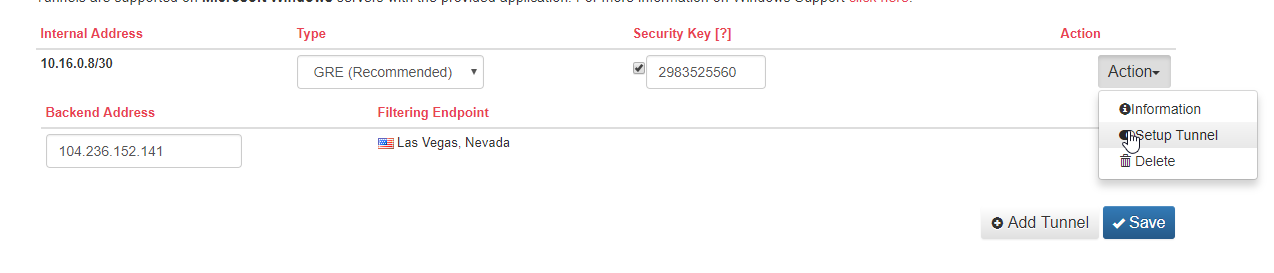
After configuring a backend, and adding all the required port forwards to that tunnel backend you can get a script from the Setup Tunnel page (On the tunnel Action > Setup Tunnel) that you need to ensure runs on each boot of your server to start up the tunnel.
Step 3: Download the tunnel configuration
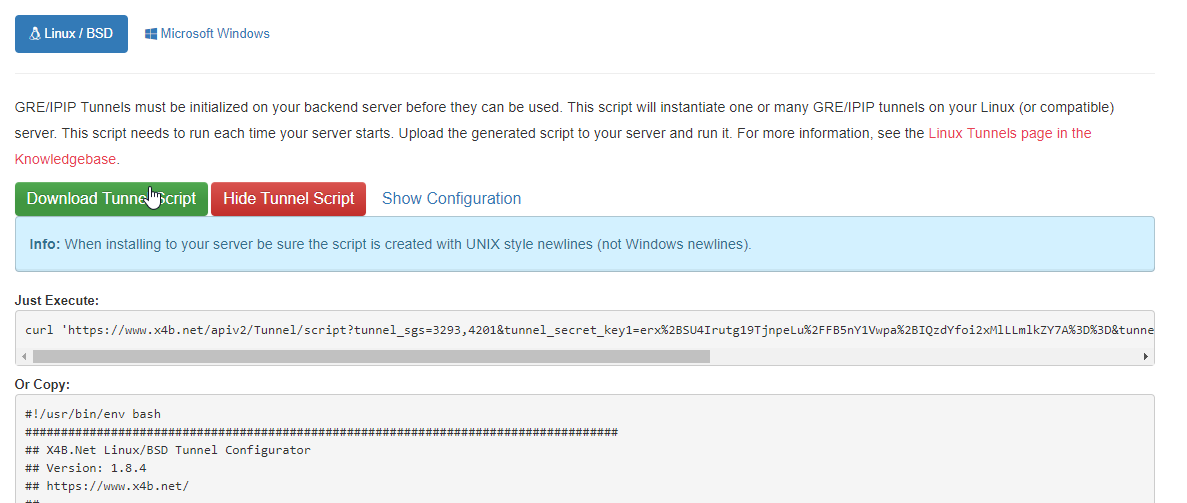
You can now download the script which has been generated to install your GRE, IP-in-IP tunnel. If you are installing multiple tunnels, or you have multiple tunnels to the same backend IP address (i.e with multiple services) you should check the configuration matches your requirements.
Step 4: Install the tunnel on your server
First run the downloaded tunnel.sh script on your server. This installs the tunnels for the current session.
./tunnel.sh
This script needs to be run on boot, and should hence be set up to run on boot. If you are running a SysV style init process (i.e not new Debian, CentOS or Ubuntu distributions) then you can install the tunnel with a simple execution of:
./tunnel.sh install
Unfortunately we do not support SystemD at this time. If you are running SystemD you will need to set up the script to run on boot manually.
Provided setup tools
The Dashboard generates tunnel.sh as a convenience implementation for Linux and FreeBSD. It configures the selected tunnel endpoints and, on supported Linux Unified Tunnel setups, the connection-aware policy routing and packet marking needed to return traffic through the tunnel that received the connection.
x4bwintunnel.exe is the corresponding convenience utility for supported Windows tunnel and Unified Tunnel setups. It performs the required Windows-side routing and forwarding work for the configuration generated by the Dashboard.
These tools are optional. You may implement a tunnel with your own script, router, or automation when it uses the Dashboard-provided endpoints, regions, tunnel type, and MTU and preserves the same required behaviour. For Unified Tunnels this includes connection tracking, packet marking, and policy routing so replies leave through the appropriate tunnel.
We can help confirm the X4B Dashboard configuration and service-side observations. Custom scripts, routers, firewall policies, and backend application configuration remain your responsibility unless you have a management agreement.
On Windows
See the article on IP/IP on Windows for Microsoft Windows instructions.
Tunnel Types
Types of tunnel supported include IP-in-IP (IPIP) and GRE
IP-in-IP or GRE?
To help you make your decision between the two protocols a comprehensive article has been written. If in doubt, we recommend that you use Generic Routing Encapsulation (GRE) if supported.
Features
Ports and backend binding
A tunnel must be referenced by at least one Encapsulated or Routed port before it is deployed in a region. A port configured as a Reverse Proxy does not use the tunnel. Each tunnel backend must be used by a port at least once; create a single inbound port even when your primary requirement is outgoing traffic.
For TCP (Tunnel) and UDP (Tunnel) ports the client IP is available without backend modifications.
For HTTP (Tunnel) or HTTPS (Tunnel) ports the client IP is provided in an additional HTTP header. The IP can be retrieved with a web server module or through code (see the Real IP article). This is the same technique used with HTTP reverse proxy services.
When the tunnel is online but the service is not reachable, confirm that the backend service listens on the assigned 10.x.x.x address or on all interfaces. A service bound only to an unrelated public interface cannot receive tunnel traffic.
Security
GRE / IPIP Tunnels improve the security and resilience to malicious attacks. This includes susceptibility to backend IP discovery attacks. Most IP discovery attacks are performed through misconfigured web environments or insecure services. In these cases with a GRE/IPIP tunnel the service is bound to a 10.x.x.x address, instead of the backend public IP and as such will only leak the internal IP (which to an attacker is useless).
Advanced Configuration Notes
MTU and encapsulation
The default MTU shown in the Dashboard is calculated from the smallest known path MTU and the selected tunnel type. GRE adds additional header overhead, and GRE with optional UDP encapsulation adds more again, so you may need to reduce your backend interface MTU further if your upstream network adds additional overhead.
Dashboard backend health state
The tunnel list shows a backend monitoring state and the time that state last changed. Treat this as a troubleshooting signal for intermittent packet loss or inconsistent reachability from the filtering network, not as a diagnosis of your backend application or a guarantee that every protocol is available.
BGP
Border Gateway Protocol is a standardised network protocol for exchanging routes and reachability information. For us this enables redundancy through Fallback & Failover for customers utilizing a GRE tunnel with their backend.
When creating a tunnel, you may choose to create a BGP Tunnel. BGP cannot be enabled on an existing non-BGP tunnel. When enabled, traffic is routed only to a backend with an enabled and online BGP session. You may define multiple backends, each with its own session; traffic is routed to the eligible online backend with the highest local preference value. This provides tunnel-level failover, but does not configure your backend application or replace its own health checks.
Tunnels created for BGP will have a subnet in the 10.17.0.0/16 range. 10.17.240.0/20 is used for BGP peering. We will allocate you a ASN in the 32bit private ASN range. If you have your own ASN number that you wish to use and own (LOA required), please contact support.
Many BGP clients exist including Bird, Quagga and ExaBGP. You may also use a router or hardware solution. If you are unsure or have no preference then on Linux we recommend Bird. A tutorial for setting up with Bird is available for Linux.
Unified Tunnels
The terminology Unified Tunnel is used to refer to a specific type of tunnel that meet the following conditions:
- Tunnels containing multiple spokes and a single backend IP on a Anycast Service.
- The same internal subnet (i.e 10.x.x.x/30), and hence a single backend IP shared between all tunnels.
These are a very specific type of tunnel and are supported on Linux and Windows only (not BSD or third party solutions). To run these tunnels on Linux you will require a server with IP Conntrack (ip_conntrack) enabled. Support is included in X4BWinTunnel for Windows Unified Tunnels, this does not require any external software.
On Anycast services a Unified tunnel with a spoke defined for each location is required to make outgoing connections.
Advanced: How Unified tunnels work
NOTE: You don't need to know this, for all but the most advancted cases tunnel.sh takes care of everything. This information however can be useful for troubleshooting or customization.
This information is valid for Linux on Windows x4bwintunnel takes care of all routing and forwarding in userland inside the Application (.exe).
What tunnel.sh installs for you:
- Policy Based Routes (PBR) via
ip rule - Routing tables with the prefix
X4B*and with IDs incrementing up from130 - IPTables rules in the mangle table via
iptablesin system chains and in chains with the prefix ofX4B*
What IPTables rules are installed?
Chain: X4BINP
X4BINP is responsible for marking every tunneled connection with a mark unique to the tunnel it originated on (or last communicated over). This mark (ctmark) will be used to ensure traffic that originates on one tunnel returns via the same tunnel.
The IPTables chain INPUT is responsible for calling the X4BINP chain. A rule is added for this.
Chain: X4BOUT
If the packet is from an IP owned by the tunnel (non-exclusive mode) or if the connection entry has a connection mark (exclusive mode) then restore this (set) the packets mark. The policy based routing rules will use this mark to direct the packet to the appropriate tunnel.
The IPTables chain OUTPUT and FORWARD is responsible for calling the X4BOUT chain. Rules are added for this.
Chain: X4BPRE
X4BPRE is called by the IPTable PREROUTING chain in the mangle table. This chain is used to handle packets for clients performing ip forwarding and nat activities (advanced setups).
We install rules in this chain to handle both X4BINP and X4BOUT roles as well as additional rules for handling customer nat matching (if tunnel.sh is not configured for exclusive control).
What do Policy Based Routes (PBR) do?
A policy based route is a rule that directs traffic to a specific network interface (e.g tunnel) given a specific set of conditions. In our case with unified tunnels this means a specific packet mark set by IPTables.
What is exclusive mode
Exclusive mode is disabled by default but is enabled by setting X4B_EXCLUSIVE_MODE=1 in the generated tunnel.sh. This will relax the IPTables rules created in a way that may reduce compatibility with other scripts or services also using IPTables. This is however advisable in any double NAT or complex networking set up (for the sake of your sanity),
Exclusive mode requires that you allocate the fwmark & ctmark mask 0xff000000 exclusively to us. If you are running any other firewall scripts making use of fwmark or ctmark you must not enable this option.
When running with exclusive mode enabled the source IP address will not be checked before routing via the tunnel. This allows for modules that change the IP Address at a later stage (e.g SNAT/MASQUERADE) to function without excplicit rules being added.
Tunnels behind NAT (and consumer ISPs)
We get asked often if you can run a tunnel behind a NAT on a Consumer Grade (Residential) ISP. The answer is often yes, but you need a higher level of technical know-how to do it. We would generally advise our customers that they will get a better result on a professional set up (such as a VPS or Dedicated server service). If however this set up still interests you our notes are below.
Requirements: - You need to know how to configure your NAT router to forward tunnel (i.e GRE) traffic to the destination within your local network. This may require placing your server on a "DMZ" which may forward all protocols depending on router implementation or replacement of your router or modem with a device with this capability. - You need to know that your ISP supports forwarding GRE traffic (some ISPs require business services to be able to use GRE tunnels). - You need to have a dedicated IP (no CGNAT) or dynamic (rotating) IPs - You need to know how to troubleshoot any issues and perform any maintenance required. We can not advise (outside of management) you on the successful operation of hardware or software within your local network (e.g your ISP issued router or modem).
Both provided scripts (x4bwintunnel.exe and tunnel.sh) are technically compabile with NAT setups. Neither script can perform administration of hardware other than the server it is run on, if that device is a PC behind a NAT router this means that configuring that NAT router is your responsibility (not the script/applications). Or in other words our network will deliver traffic to your publicly routable network IP, if the server terminating the tunnel does not have that public IP directly attached then you will need to make appropriate configuration to route traffic from the device with the public IP to the server terminating the tunnel.
If your VPS or dedicated server is behind NAT (e.g for a Firewall or Load Balancer) you will need to investigate how to forward the appropriate IP protocol (e.g ip proto 47 for GRE) to your server the same as if you were behind a consumer grade router or ISP.
Setup for servers behind NAT is located in the header of tunnel.sh (be sure to also disable auto-updates for your changes to apply) and automated when detected in WinTunnel (in some cases you will be asked questions via prompt).
Troubleshooting
Work through the following sequence before opening a ticket. We do not have access to your backend unless you provide a technical reading, and unmanaged backend, firewall, and router configuration remains your responsibility.
1. Confirm the Dashboard configuration
- Confirm that the tunnel has at least one Encapsulated or Routed port reference, and that the port is assigned to the affected region. A Reverse Proxy port does not use the tunnel.
- If you changed a tunnel, backend, region, MTU, or port configuration since downloading the setup script, generate a fresh script and apply it.
- Check that a spoke exists for every required region. Outgoing connections over an Anycast Unified Tunnel require a spoke in every available location.
- Record the Dashboard backend health state and its last-change time. This helps correlate an intermittent failure, but it does not identify the cause by itself.
2. Confirm the tunnel interface and GRE/IPIP reachability
- Confirm that the tunnel setup runs at boot and is currently active. On Linux,
ip tunnellists active tunnels. - Ping the supplied
10.x.x.xgateway from the tunnel backend. This should create GRE/IPIP traffic on the primary interface. - Use a short, header-only capture such as
tcpdump -n -c 20 ip proto 47to check for both outbound and return GRE packets. A missing reply can indicate an upstream or provider-level filter.
3. Confirm incoming traffic reaches the correct backend
- Confirm that the expected port, protocol, and region reference the tunnel.
- Confirm that the application listens on
0.0.0.0, the assigned10.x.x.xaddress, or another appropriate tunnel interface.ss -nornetstat -lncan show listening sockets. - Confirm that local and upstream firewalls permit the required GRE/IPIP protocol and service traffic. Do not disable a firewall solely for testing; use a controlled rule or your provider's guidance.
4. Confirm return-path behaviour
- For a Unified Tunnel, verify the X4B policy-routing rules with
ip ruleand the X4B mangle-chain presence withiptables-save -t mangle. The generatedtunnel.shuses these to preserve the connection's return path through its originating tunnel. - If you use a manual implementation, verify that it preserves equivalent connection tracking, packet marking, and policy routing. Do not mix unrelated firewall mark ownership with X4B's configured mask.
- If the application makes outgoing connections, ensure it is not bound to only one unrelated interface.
5. Check provider and backend-network constraints
- Confirm connectivity to the listed backend communication IPs from the backend.
- Ask your backend or access provider whether it filters GRE/IPIP traffic. This is especially relevant behind NAT, consumer connections, and providers that restrict IP protocol 47 for GRE.
- Check your backend server and network for active incidents before treating a tunnel status change as an X4B network issue.
Safe diagnostic information for support
Include the service and tunnel identifier, affected region, port and protocol, whether the issue is inbound or outgoing, the start time with timezone, and the Dashboard backend health state. Include redacted, bounded outputs from ip tunnel, ip rule, the presence of X4B mangle rules, and a short GRE/IPIP packet-header capture where relevant.
Do not send tunnel.sh, x4bwintunnel.exe configuration, private keys, PSKs, API credentials, full firewall configurations, packet payloads, or customer traffic. Describe custom routers, firewalls, and backend changes at a high level instead.
Notes
- Each Tunnel Backend must be used at-least once in order to be deployed. If you are looking to send outgoing connections you will need to create a single incoming port.
- Some Residential ISPs filter GRE & IP-in-IP traffic. Barely any consumer grade routers support GRE/IP-in-IP NAT, although most can handle it with a DMZ.
- OLD: Kernels approximately within the range of 2.6.32-358 to 2.6.32-431 may have a MTU collapse issue resulting in intermittent tunnel failures. If you are using a kernel this old you should really upgrade.